A developer portfolio built around Three.js: skills float as interactive 3D icosahedrons and each project is a hand-modeled, spinning Game Boy cartridge.
An earlier portfolio built to show off 3D on the web rather than describe it. Twelve skill icons float as icosahedrons stamped with tool logos; click one and it springs up while its description updates. Every project is a Game Boy cartridge modeled in Blender and rendered in its own canvas, auto-rotating while a horizontal carousel swaps in its links.
React 18 and TypeScript on Vite, with React Three Fiber and drei for the scenes, React Spring for 3D scale animation, and Framer Motion for section transitions. Cartridge canvases render on demand, models are preloaded, and a shared loader shows progress. The contact form posts straight to EmailJS with no backend.
Most of the art, models, and animation are hand-made. The site is live on Vercel↗, and the full write-up of how it was built follows below.
Case study
01Intro: dusting off the portfolio
It has certainly been a while since I've last thought about updating my portfolio. The last portfolio I worked on for myself was in 2018 (5 years ago, yikes!). Over the years I have learned so much about front end development that it was probably about time to create a new portfolio for myself.
The finished hero, with DevBoy and its floating tools
02Inspiration and focus
The next step was for me to look through some modern portfolios and designs around the web. I scoured sites like Awwwards, Dribbble, and Behance to gather some ideas. As I was scouring through some of these amazing sites, a lot of them had a common theme that caught my eye: 3D.
I had always wanted to take a shot at adding an extra dimension to my work. Coincidentally, over the past month I had also been learning and messing around with Blender (a 3D open source modeling software). So what better time than now to give it a fair chance?
03Keep it simple, stupid
Since my focus was primarily on implementing 3D, keeping the portfolio design and technology simple could help me minimize feature creep. At the same time, I wanted my portfolio to scream what resembled me. That was the easy part: video games made up a great part of my life, so I decided to center my portfolio around a gaming theme.
For my portfolio I really only needed two things: a projects section, a contact section, and later on… a skills section (I know, feature creep, but I had a good reason). React was something I was comfortable with, and trying a minimalist design kept with the simple theme.
Next was for me to figure out: what do I want to make 3D?
04Grease Pencil? 🤔
Yep, you read that right! Grease Pencil is a special object in Blender that allows you to draw in a 3D space. This object acts like any other object in Blender, which means you can edit, animate, apply textures, and many other things. I was pretty anxious to try something like this since my Blender experience is kind of… lacking. So what's the best way to jump into learning? YouTube!
I mainly watched a two-part series on YouTube to learn more about Grease Pencil and tried to concoct something of my own. To stick close to my theme of gaming and simple, I thought creating a Game Boy (and calling it DevBoy) with technologies floating around it, and animating it, would make for a nice eye-catching hero. (It seems overwhelming, but trust me, as a Blender newbie, even I was able to make something. It was just real tedious.)
Rough draft and line art of DevBoy
However, drawing and animating this was not all sunshine and rainbows. Initially I wanted to showcase the Game Boy rotating a full 360, where you would be able to see all sides of the object and interact with it. Because a real Game Boy is not fully flat and is curved in the bottom right corner, I was not able to replicate that at all. This was not rendered in Three.js, and I decided to animate it and make it a looping video.
The layers were also see-through. To my understanding, this is because the layers are set traditionally as 2D layers (the same kind you would find in Photoshop), ordered top to bottom, foreground to background. A 3D layer setting exists, but with the way I built out the Game Boy, I would have had to start from scratch. So, because of those issues, the entire right side is missing. I had to compromise and animate one side of the Game Boy (which is not bad, but could have been better).
The entire right side is missing
05Yeah, I've got skills
If the hero wasn't going to use Three.js, surely the skills section would? You betcha! Instead of placing a list of squares on the page, how about a list of 3D objects instead 😏. Reading through documentation, I generated a number of icosahedrons (I know, a mouthful) on the page and slapped some technology logos on them.
Even though the idea was simple, executing it was another big part of the journey. When I attempted to load each skill on its own canvas, I found out about WebGL limits and that some browsers and devices can't load very many canvases (canvasi?). I found out when I previewed the site on my phone, and it was not loading half of the shapes I wanted.
I had wanted the user to be able to control and rotate any shape, but I had to sacrifice that. However, that sacrifice was not in vain! I learned how to properly load and space each skill on one canvas, and it led me to pick up information on orthographic cameras along the way. To me, learning is always a plus!
Skills section
Overall, this section was not bad and can be considered done. But there is something that can always be made better. I'm disappointed that it still somewhat remained simple, but next time I'll have to include a wow factor that accentuates the 3D-ness of this section.
06Time to bust out the pens
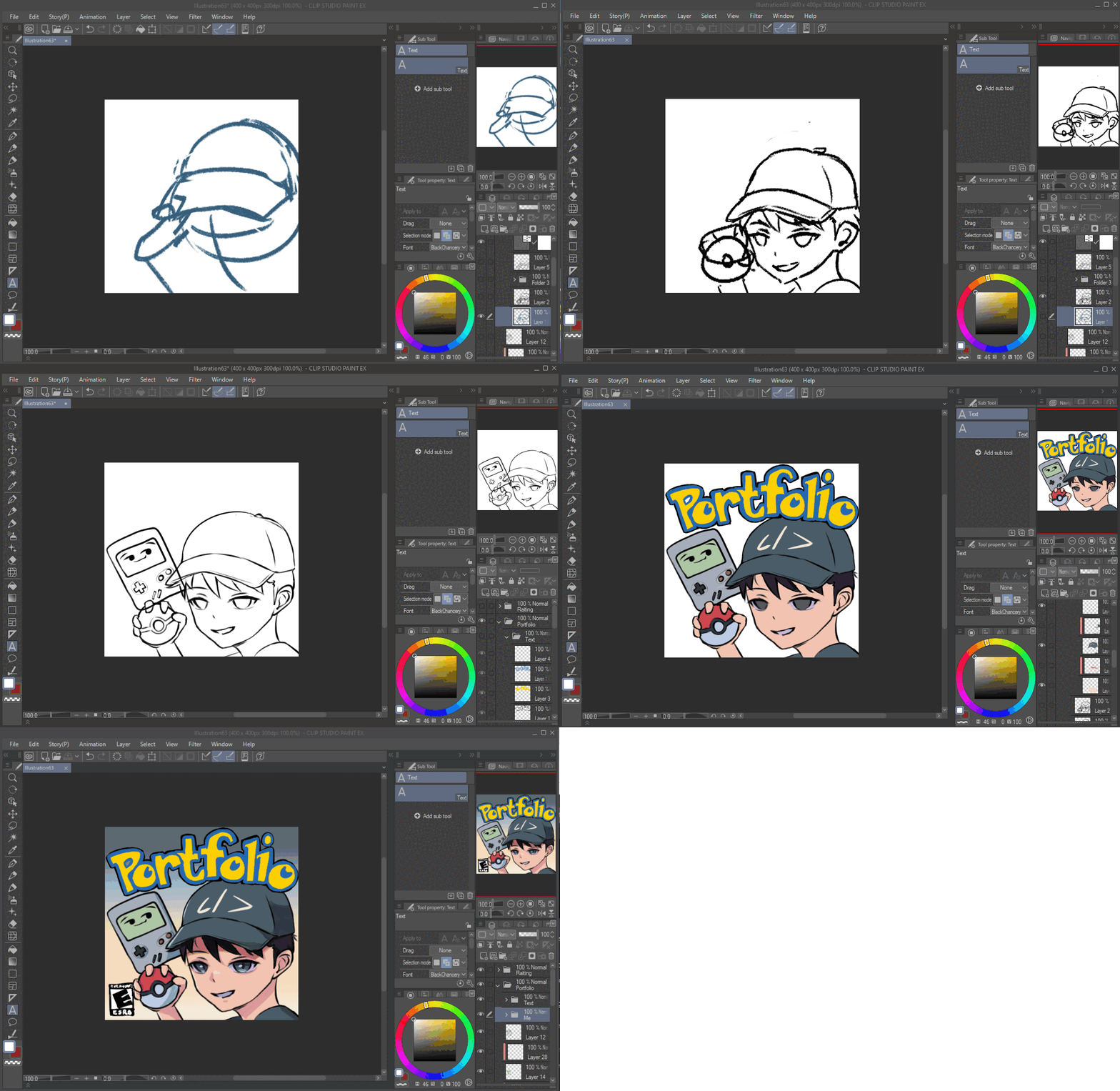
Ahhh… the projects section. This made me realize that I'm lacking in the project department, but at the same time this section was mind-blowing and the most fun part of this project. My plan was to showcase my projects as floating Game Boy cartridges and draw the cover on the cartridges. The most fun part of this was drawing the covers. I took a lot of creative inspiration from old games like Pokémon and tried to tie in elements of the project and a different art style.
Drawing the portfolio cover
After drawing the covers, I imported them into Blender, added them to the Game Boy cartridge model, and loaded them onto the site. IT LOOKED SO GOOD. Other than the 3D and art, the section itself was pretty straightforward.
07What can I do better
I can call this project done, but I can definitely do better. I was able to throw 3D objects in there combined with my art (both things I had never done before), so I can say I'm pretty proud of what this has become. I couldn't quite overcome some issues I had in Blender and Grease Pencil, and I wasn't able to create a bigger wow factor than spinning 3D objects, but that's likely due to my inexperience in the 3D world holding me back.
I didn't spend much time on this portfolio (about two weeks) and am looking to try a different approach in the future: make a big portfolio with a BIG WOW factor that I can keep adding onto over the years.
Maybe in the next 2-5 years (I should still be around 👀) I can revisit and create a new portfolio with better art and 3D shenanigans. See you then!